Friday, January 29, 2010

She passed a way..

She suffered a lot on her last years..

She stood as the oak tree against the hurricane..

She never waved the white flag..

She gave me the hope to continue..

She gave me the courage to keep standing…

She passed a way after 3 years fighting the ugly disease..

May GOD give her what she kept asking for, the “Janna” ..

I miss you Iman, I miss you a lot..

Your husband bilal, just one week after you left this life..

Sunday, December 27, 2009

Visit me on another time!

hi all,

I am sorry for not blogging for the last couple of months but it is just a personal issue I am facing and stopping me from doing all of my activities that I used to do.

It is just a matter of time and I will be back. Wait for me and remember to keep visiting me from time to time

Best regards

Bilal Okour

Tuesday, November 3, 2009

Magic Quadrant for Enterprise Content Management

Its really interesting to know how much MS solution for ECM (ECM in MOSS 2007) achieved while trying to position itself as one of the major vendor for ECM.

As per the article published on GARTNER website you can see the  MS ECM is among the best

170685_0001

for more details please check out this

http://www.gartner.com/technology/media-products/reprints/microsoft/vol10/article3/article3.html

Best Regards

Bilal Okour

Tuesday, October 20, 2009

The missed link between PMI/Prince2 and MS EPM

My clients for MS EPM keeps asking for a real and challengeable features. They are mature enough in the scenes of Project Management to the level that they keep asking me to implement there (PMI or Prince2) methodologies using the existing features of MS EPM. In both models, there are some workflows that connect between different phases. In workflows, the data are simply gathered during the workflows steps and pushed accordingly. 

Saying so, we are talking about data being gathered in MS EPM itself and another Methodologies data being gathered through the WSS workflows being developed and deployed over there. I assume that you reached to that point where you have started using workflows features that comes along with WSS 3.0. I expect you now to reply here and say:

Hey man, what about Project Workspace, it gives you what you need, it is the link between MS Project Server and WSS.

I will say immediately: It is not a link because the WSS lists that I am talking about are not hosted in any of the provisioned MS Project Workspaces. Those lists are hosted directly on the PWA.

If you got my point so far then it will be easy to say that you must have faced the situation where there is no link between MS EPM PWA data and WSS lists data, and I can feel your disappointment when get the truth that there is a missed link over there.

The good news here: I will be working in developing some solution to open the bridge in two ways between PWA and WSS. I will keep you updated about that.

Best Regards

Bilal Okour

Friday, October 9, 2009

Just for you to remember the history, Visual Studio Documentary

I found this page while browsing, I liked it alot because it brought me back to those days when I was doing only coding. It is the history of Visual Studio, the magic tool from MS. Dot want to be boring, here is the link, enjoy :)

http://channel9.msdn.com/shows/VisualStudioDocumentary/The-Visual-Studio-Documentary-Part-One/

Best Regards

Bilal Okour

Do Blogging and Twittering at the same time


A nice plug-in for Live Writer will allow you to send your blog post direct to your twitter account. here we go

http://gallery.live.com/results.aspx?c=0&bt=9&pl=8&st=5


image

Enjoy,

Bilal Okour

Sunday, August 30, 2009

Code 7 Competition: It’s your turn to win


image

It’s your turn to win
We know you’ve got stellar skills – it’s about time everybody else knew it too.
Code7 is where your ingenious application meets the opportunity to get millions of eyes on your work, plus a trip to PDC09 and some serious cash and much more.


Crank it up
Show the world what you’re working with and take things up a notch when you code to the power of Windows® 7.
Take three minutes to video yourself talking about your application idea for Windows 7 and you could win big.

Best Regards

Bilal Okour

Wednesday, July 29, 2009

Upcoming PMP & MS Project 2007 Training from LIFELONG Kuwait


PMI Certification Preparation
Preparation for PMP Certification

Saturday, July 18, 2009
(Download Outline)

PMIS Training
MS Project Professional 2007
Sunday, July 19, 2009
(Download Outline) - Advanced levels are also available on request

Preparation for PgMP Certification
Saturday, August 01, 2009
(Download Outline)

Preparation for PMI-SP Certification
Saturday, July 25, 2009
(Download Outline)

LIFELONG Logo

 image


Best Regards

Bilal Okour

Monday, July 27, 2009

What is the different between Physical % Complete & % Complete

Suddenly i have been asked this question! Although it seems that is something that I should know as a daily user of MS Project Pro. But guess what, I said I don’t know.

The first moment after that I opened MS Project Help and I found that it is little bit tricky. The physical % complete is a field that can be used to calculate the Earned Value, now the question is How!

I will use the same example found with the help page, assume that one task in your project is to build a stone wall, the wall is a 5 rows one, each has 10 stones.

The first row takes 20 minutes

The second takes 25 minutes because it is little bit harder.

The third takes 30, the forth 35 and the fifth will take 40 minutes

After completing three row then we can report the % Complete and % Physical Complete as per the figure below

image

I hope that illustrate the difference for you, for me it really did

Best Regards

Bilal Okour

Saturday, June 27, 2009

Blogging while in vacation

Well, it is strange that someone keep the same mode before and during the vacation time. In fact, I am not from that type, I used to switch myself into Vacation Mode in the first minute of my vacation time. Refreshment is mandatory for continuity. In other simple words, i am relaxing now and one of my relaxing activities is reading and accordingly BLOGGING:) . Do you agree with me that Blogging is another cool thing you can do it while relaxing??

Anyway, for the sake of not being boring I just wanted to share with you one important article i read it from Office Online Help site

here we go

http://office.microsoft.com/en-us/project/HA102130271033.aspx

Best Regards

Bilal Okour, Jordan, Irbid

Wednesday, May 27, 2009

Microsoft Project 2007 Courses in Kuwait


Hi All,

imageIt will be my pleasure to announce the lunch of our specialized training courses in MS Project Professional 2007. Those courses are new as i have  introduced three level of the courses, they are short terms courses that fit the busy users and of course all are most cost effective.

Three levels (Beginner, intermediate and advance) are designed to facilitate the flexibility by providing different options according to each interest needs.

Later on I will be announcing the MS EPM 2007 courses very soon, be tuned

For more information please feel free to download the course broacher here

Monday, May 25, 2009

Very useful web site: Microsoft Canada Enterprise Project Management

Check this link and enjoy the great links collection all about MS Project 2007. The site owners put great efforts in this post

http://mscanadaepminfo.com/EPM2007.aspx

Best Regards

Bilal okour

Tuesday, May 19, 2009

Project 2007 Service Pack 2 recorded webcast and deck are now available on EPMConnect


as per Christophe Fiessinger’s latest post in his blog, the MS EPM SP2 webcast recording is now available in EPMConnect site

read more in Christophe blog at

http://blogs.msdn.com/chrisfie/archive/2009/05/14/project-2007-service-pack-2-recorded-webcast-and-deck-are-now-available-on-epmconnect.aspx

Best Regards

Bilal Okour

Monday, May 18, 2009

I am twittering now! follow me or I will follow you

image I have started getting more and more involved in updating my twitter page with my latest or MS EPM latest. Twitter is somehow a “light blogging + RSS subscribers”. the beauty of twitter is that it is easy to write, easy to read and easy to share. The challenge now is how to find a time to keep up with Facebook, my blog, my twitter, my linkedin, and my old hotmail account. Getting connected to the people around the world is something pretty good and it enrich my knowledge dramatically.

For those who would like to follow me on twitter please follow http://twitter.com/ebilal


Best Regards

Bilal Okour

Thursday, May 7, 2009

Microsoft Project SP2 is announced by Microsoft

Hi folks,

Microsoft has announced the release of MS project 2007 (Server,Professional and WSS 3.0) Service Pack 2. To read more information please visit this post from the official blog of Microsoft Project Team

http://blogs.msdn.com/project/archive/2009/04/28/announcing-service-pack-2-sp2-for-microsoft-project-2007-and-microsoft-project-server-2007.aspx

image

Here are the download links (As per the official blog of Microsoft Project Team)


Service Pack 2 (SP2) Download Center Page

Office Project 2007 (x86)
http://www.microsoft.com/downloads/details.aspx?FamilyId=B7DF323E-73B8-4344-826A-A01E6F920B1B

Office Project Language Pack
http://www.microsoft.com/downloads/details.aspx?FamilyId=B7DF323E-73B8-4344-826A-A01E6F920B1B

WSS (both x86 and x64)
http://www.microsoft.com/downloads/details.aspx?FamilyId=79BADA82-C13F-44C1-BDC1-D0447337051B&displaylang=en

WSS Language Pack (x86)
http://www.microsoft.com/downloads/details.aspx?FamilyId=085E5AC8-58F6-4CF9-8012-33B95EE36C0F&displaylang=en

WSS Language Pack (x64)
http://www.microsoft.com/downloads/details.aspx?FamilyId=2C2B6CAF-B46D-45EB-AC4D-DEAAA48C3A2C&displaylang=en

Office Servers (x86 and x64) (contains Project Server SP2)
http://www.microsoft.com/downloads/details.aspx?FamilyId=B7816D90-5FC6-4347-89B0-A80DEB27A082&displaylang=en

Office Servers Language Pack (x86)
http://www.microsoft.com/downloads/details.aspx?FamilyId=01C6A3E8-E110-4956-903A-AD16284BF223&displaylang=en

Office Servers Language Pack (x64)
http://www.microsoft.com/downloads/details.aspx?FamilyId=66C5026F-9F47-4642-8378-2526918009FA&displaylang=en


Best Regards

Bilal Okour

Tuesday, April 21, 2009

I want this report, right now!

Yes, most probably you had faced this situation while showing to your boss one of the great view that comes with Microsoft Project Professional 2007 or the views that you have customized.  If you did a great job in showing or customizing such a view then you will expect your boss to ask you to print it as report and send it to him/her, right now!

So the idea that I will illustrate in this post is summarized as the following

  • Customize your own table with the specific fields that your boss is looking for
  • Customize your own report to show this view/table as report
  • Make this report available for all projects

Step 1 : Customize your table

  1. Click on View => Table:  => and select More Tables

    image
  2. In the dialog below click on New

    image
  3. Enter the table information as per the image below

     image
  4. Click Ok to save your table, remember the table name “Track Summary Report”
  5. Click Apply to see your table


Step 2: Create Your Own Report

  1. On the menu bar, click on Report => Reports then click on Custom 

    image
  2. The dialog will list all the available reports, we will not use any of them, we will create our own, right? So click on New

    image
  3. Select Task, remember that we will design a report that will show the Tasks’ Tracking Information

    image
  4. Fill in the information for your report as per the dialog photo below

    image
  5. Click Ok after finish and click in Page Setup, usually you need to select the Landscape layout to be able to print as much information as you can in a single page. Don’t forget to set the paper size to A4

    image
  6. Click in Header and Footer tap and feel free to edit the look and feel of your report header and footer

    image
  7. Click OK, then “Preview” to preview your report

    image
  8. You are done, click Ok several time to go back to MS Project Pro 2007 main menu

Step Three: Make this report available to all projects

  1. On the main menu Click on Tools => Organizer

    image
  2. Select Report tab, select the “Tracking Summary Report” and then click << Copy to copy it to the Global template. So it will be available for the other projects

     image
  3. Done

Best Regards

Bilal Okour

Wednesday, April 8, 2009

MS Project 2007 Top Shortcuts


Hi,

Here are some basic shortcuts for MS Project 2007 that can speed up your daily experience with MS Project 2007

Action Keyboard Shortcut
Indent a task ALT + SHIFT + RIGHT ARROW
Outdent a task ALT + SHIFT + LEFT ARROW
Link tasks CTRL + F2
Unlink tasks CTRL + SHIFT + F2
Scroll to Task on Gantt Chart CTRL + SHIFT + F5
Scroll the timescale left ALT + LEFT ARROW
Scroll the timescale right ALT + RIGHT ARROW
Insert Row Insert


The complete list of the shortcuts can be found here

http://office.microsoft.com/en-us/project/HP101550121033.aspx

Best Regards

Bilal Okour

Saturday, April 4, 2009

MS SharePoint Designer 2007 For Free!


Microsoft announced recently that  MS SharePoint Designer 2007 is available for FREE. As per the official web site of Microsoft (http://office.microsoft.com/en-us/sharepointdesigner/FX100487631033.aspx )

image


For EPM 2007 customers and administrators they can change the look and feel of the projects workspaces to reflect their organization image layout.

Best Regards

Bilal Okour

Monday, March 30, 2009

Info Edu Day, It was really GREAT


I think that the third show of the InfoCenter yearly event have been done this year with a lot success indicators.

  1. It introduce wide range of sessions with different topics (51 sessions as I remember)
  2. New speakers shown up
  3. New attractive topics. There was one about Leadership and another one was about Internet Marketing
  4. Catering Service was good in general :)

Audience low size was the only bad side of this event and I believe it was because people in Kuwait love to do anything in Non-working day, yes any thing except attending events! Next time I would like to suggest the organizer to consider working days for such big event.

Any way, as an overall evaluation, it was a BIG success. See you next year inshalla and don’t forget to register in my session at that time :)

Best Regards

Bilal Okour

Sunday, March 29, 2009

Where are going tonight??


Microsoft Dev Nights, Kuwait, 1st of April

DevNight-Kuwait

Map

Best Regards 
Bilal Okour

Friday, March 27, 2009

I Can't see PERT Analysis in the Toolbar??


imageThis is what happened with me while demonstrating MS Project 2007 features, OOPS!. I went home back and start googling for some good time. I found the solution and it was really interesting imagefor me to share it with. 


Please go through the following link and follow the steps

http://office.microsoft.com/en-us/project/HA101636871033.aspx

Wednesday, March 25, 2009

Watch This! And Keep Watching!


imageHi, I found this list of a very fantastic videos with each of 3-5 minutes duration. I am sure that you will start watching one and continue till you watch all.

Now I will leave you with this collection

http://office.microsoft.com/en-us/project/CH100740881033.aspx

Best Regards

Bilal Okour

Monday, March 16, 2009

I will be speaking in Info-Edu Day March 28, 2009


Dear All,

speakingI would like to take this opportunity to invite you and your teams to register and attend the FREE deep  dive workshops that took place on a yearly basis at InfoCenter.


Also feel free to register in my session “ Microsoft Enterprise Project Management (MS EPM)”  using the below link


http://www.infocenter.com.kw/InfoEDUDAY2009/infoEducation%20Day/ProjectManagement.htm

For more details please read below ..

50 FREE Deep Dive Workshops @

Info Edu Day 2009

Saturday March 28, 2009

Kuwait City, Duwalia Building, 5th Floor

Infocenter Institute

clip_image001

Seats Are Limited, Register Now!


Best Regards

Bilal Okour

Sunday, March 1, 2009

Nice Post I read


A nice article that list a lot of links for useful Support & Reference links

http://projectserver201.blogspot.com/2007/08/microsoft-epm-enterprise-project.html

Best Regards

Bilal Okour

Saturday, November 15, 2008

Watch these 8 videos to start using MS Project 2007


imageA series of 8 video (shot ones) that covers the project management life cycle using MS Project.

it covers the basics of Project Management and will illustrate the Project 2007 interface. It also explain how to start new project, how to define tasks, how to assign resources to tasks, how to estimate the cost and how to report the project progress

here is the link

http://office.microsoft.com/en-us/project/HA102820011033.aspx

Best Regards

Bilal Okour

Sunday, November 2, 2008

25 Microsoft Project Tips and Tricks


tipsA good tips collection from CriticalTools 

http://www.criticaltools.com/Tips.htm

Best Regards

Bilal Okour

10 Signs You Don't Really Know Microsoft Project


This is one of the best articles that I ever read, it is highlighting the most BIG MISTAKES that might result in bad outcome of using MS Project

http://www.pmconnection.com/modules.php?name=News&file=article&sid=32

Best Regards

Bilal Okour

Wednesday, October 29, 2008

Microsoft's Theory of I.T.Evolution Event


At IT Evolution 08, get a front row seat as we unveil technologies like Hyper-V, App-V and Virtual Machine Manager that will help you ride the hottest trend in IT today -Virtualization.
Come and attend this big show as per your country schedule below

ms event

Monday, September 1, 2008

Timephased view, It is not there anymore


I have installed the latest infrastructure update for both SharePoint WSS 30.0 and Project Server 2007. I was really impressed with the GREAT enhancement that has been done through.

The most feature I liked was the Timephased view. But I faced one problem where suddenly this view was not showing and i was back to the normal view before applying the infrastructure.

Needless to mention what I did to fix this out but finally I figured it out.  So the reason behind not showing the Timephased view (Calendar view) was because I have modified the My Assignment view and have removed the "Progress [Assignment]" field in the related view.!


image

image

This field should be there to get the Timephased view showing correctly, for me I was trying to make this screen simple for my customer and % Work Complete was the main field. That is why I removed the rest.

As a conclusion, don't change the default selected fields for this view in order to get the My Tasks page shows the views as expected.


Best Regards

Bilal Okour

Sunday, August 10, 2008

Articles that I read and would like you to read


A cool article that brings you back to basics, but still it is very important to understand

Subject: Back to Basics: Understanding task dependencies

Best Regards

Bilal Okour

EPM Quick Reference Guide for Project Managers & Team Members


Microsoft published new Quick reference guide for Project Managers and another one for Team members. These are really great where I have been asked by a lot from my customer to provide with such a quick references

  image

Here are the links

For Project Managers: http://office.microsoft.com/en-us/templates/TC102865051033.aspx

For Team Members: http://office.microsoft.com/en-us/templates/TC102880551033.aspx?pid=CT101441451033

now they are free and in Word format


Best Regards

Sunday, August 3, 2008

4 in 1

Did you get the chance to explore the Project server Database, if yes then I am sure that you wonder why there are 4 databases created for each instance of the PWA. I will not answer why but I will till you in brief what is the purpose of each

 arch

  1. The Draft database contains tables for saving unpublished projects from Project Professional and other applications. Project Web Access does not show project data in the Draft database.
  2. The Published database contains all of the published projects as well as enterprise resources, the enterprise global template, and other project templates. Published projects are visible in Project Web Access. The Published database also contains tables that are specific to Project Web Access (timesheets, models, views, and so on), and global data tables (outline codes, security, and metadata).
  3. The Archive database saves backup and older versions of projects and other data.
  4. The Reporting database is the staging area for generating reports and OLAP cubes. Data in the Reporting database is comprehensive and is updated nearly in real time. The Reporting tables are optimized for read-only report generation.

For more details please read this article

http://msdn.microsoft.com/en-us/library/ms513875.aspx

Best Regards

Bilal Okour

Sunday, July 20, 2008

Announcing the Infrastructure Update for Office Servers

Microsoft announced the latest Infra Structure update and it contains a fixes to the claimed bugs.

For more details please visit MSDN Official blog for Project 2007

To download this infrastructure you can follow this link . Install Infrastructure update for Project Professional

Best Regards

Bilal Okour

Sunday, July 13, 2008

Forms Authentication it is amazing but?!!

I have some implementations of the EPM where I used the Forms authentication to authenticate the EPM users. I have wrote my notes and would like to share it with you regarding this

Why to go for Forms Authentication

  1. Some of the EPM users are not part of the organization domain
  2. There is no Active Directory
  3. The user can not access the organization domain

Why NOT to go for that?

Well, do you want me to speak technically or from implementation prospective?

I guess you said both?

  • Technically
    1. leakage of information for MS Sharepoint Forms Authentication as it is not embedded by default
    2. Poor user control functionality.
    3. No out of the box tool for editing users online
  • Implementation
    1. Poor approach to design the security Rules for passwords
    2. Most of the customer forgot their Forms Passwords but they don't do the same with AD passwords
    3. Accordingly getting the users accounts locked, this is not the issue, the issue is the poor approach to get them back.
    4. Integration with Outlook is another bad thing, once you open the outlook and entered your AD password you will get asked to enter your forms credential. Most of my users consider it as a double job that they don't like

Best Regards

Bilal Okour

Tuesday, April 22, 2008

Microsoft Innovation Center (Kuwait) :: Enterprise Project Management Deep Dive Workshop

MIC

Yes, MS EPM is now hitting hard in Kuwait and a lot wanted to start utilizing the power of it. As a series of increasing the awareness and importance of this solution I have conducted a lot of sessions in different large events in Kuwait

The MS EPM flight is landing in MIC (Microsoft Innovation Center, Kuwait) now and the seats are so limited :)

You can download the invitation letter from my blog (please follow this link to download), fill it and email it back to the email address mentioned in the invitation document itself.

The Workshop title will be :: Your Road Map to Project Management using MS EPM Solution and the workshop will cover the following topics (spanned into 5 days, 3 hours a day, 6-9 PM)

Day 1

Getting Started with Office Project Server 2007

Initiating Projects

Planning Projects—Context and Framework

Day 2

Planning Projects—Scope and Schedule Management

Planning Projects—Staffing Management Plan

Planning Projects—Resource Assignments

Day 3

Planning Projects—Cost, Risk and Other Management Plans

Executing Projects—Processes, Resources, and Deliverables

Executing Projects—Manage Timesheets and Personal Settings

Day 4

Monitoring and Controlling Projects—Context and Framework

Monitoring and Controlling Projects—Tracking Task and Project Progress

Day 5

Monitoring and Controlling Projects—Measuring Performance and Reporting Progress

Closing Projects

Complete Life Cycle case


For more information you can

Call me at +965 7205246

Email me: bilal@arabilla.net

Or post a comment here

Best Regards

Bilal Okour

Sunday, April 20, 2008

MS Project Server 2007 Best Practice :: Forms vs Windows Authentication

I guess so many people are happy with the windows authentication features that comes with MS Project Server and found it very easy to setup and to use. But did they know that there is another way of authenticating users, i am sure that they knew but they never think when and how to use it

Authentication

First let me focus on facts about each and when each one is recommended to be used?

Windows Authentication

  • It is authenticate users against the AD that the Project Server is joint to. So, it can use only one AD. So if all of your users are belongs to one domain then this will be your right choice.
  • Roles and groups (or any AD classification) are not used in EPM, remember that the title is all about Authentication, not authorization. Authorization is run through the security model embedded with the Project server itself.
  • Project Server users list and the AD users list is not an linked. You need to schedule synch job from within Project Server itself from time to time, this means if user has became inactive then this will not be reflected into the Project Server. (needless to say that if the user became inactive or blocked in AD then he/she will not get authenticated to AD but he can be still used as a resource in Project Server)

Forms Authentication

  • Conceptually, it is very similar to the AD authentication, except that Membership Provider will be used instead of AD
  • More flexible to contain users regardless of the AD they belongs and even if they don't belong to any AD
  • Difficult (or not straight forward to setup) to setup and maintain the users credentials.
  • No synch tool is available out of the box except for the "PjFormsAuthUpgrade" tool that comes with Project server


I will be posting more articles about Forms authentication, be tuned

Best Regards

Bilal Okour

Sunday, April 6, 2008

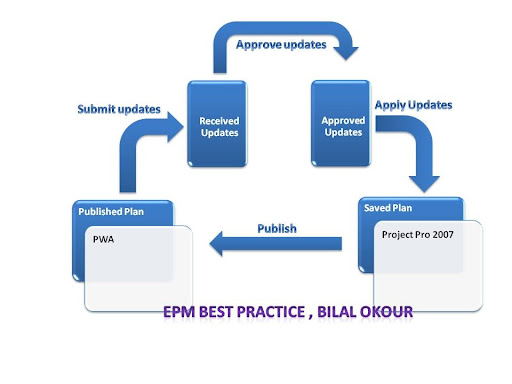
MS Project Server 2007 Best Practice :: submit, approve, apply and publish

The confusion of how to use the EPM in the right way is common everywhere. The main two player in this environment (Project Managers & Team Members) find sometimes difficult to understand why the EPM is not reflecting the progress information for any published project. To understand this you can take it simply like this

  1. PM :: Publish the project to PWA (Using Project Pro)
  2. Team Resource :: Submit the progress update to his PM (using PWA)
  3. PM :: Approve the updates received by his resources (using Project Pro) 
  4. PM :: Apply the approved updates to be reflected into the plan  (Using Project Pro)
  5. PM :: Adjust (if required) and then Publish the project plan again to PWA (using Project Pro)

The picture below can tell this in a better way

Best Practice

Best Regards

Bilal Okour

Tuesday, April 1, 2008

Microsoft Technology Day, Don't miss it next year

  Yes, I mean it, 45 sessions that touched the latest related to Microsoft were shown at the biggest event in  Kuwait. I hope you did attend your favorites topics and get the maximum benefits.

Now back to my sessions, the two rooms allocated for my sessions were full. I was expecting that due to the extensive registrations on my sessions during the registration time. At a moment I said, thanks God, I did good preparation for such an audience. It would have been a big loss if I did not do so.


pic1-88x60 pic19-600x399
pic6-600x400 DSC03564
DSC03574 pic24-600x400

The first session were about administrative part of EPM, the 2nd and 3rd were about the best practice  for Project Managers and the other main players in EPM environment.

Last one, it was supposed to be about Monitoring and Controlling, but I was able to cover part of it only, the rest inshalla will be conducted in the future in a separate session

I have announced www.pmroad.com as the first community for Project Managers in Kuwait. also I announced the start publishing of a series about the best practice in EPM on my blog


So, my recommendation for you "From now and over, don's miss any event related to the main communities in kuwait (dotNetboom, ProRangers and msexperts) and expect it to be always BIG by default"

Best Regards

Bilal Okour